

Email Verification Online & Bulk Email List Validation
Verify and clean email lists up to 9 million addresses: SMTP validator, MX record check, mailbox existence. Work from the web dashboard, the API, or the Telegram bot.
Verify AddressesEmail address verification and list cleaning, made simple
Bulk email list validation up to 9 million addresses per job. Work from the web dashboard, the REST API or the Telegram bot, whichever suits you.

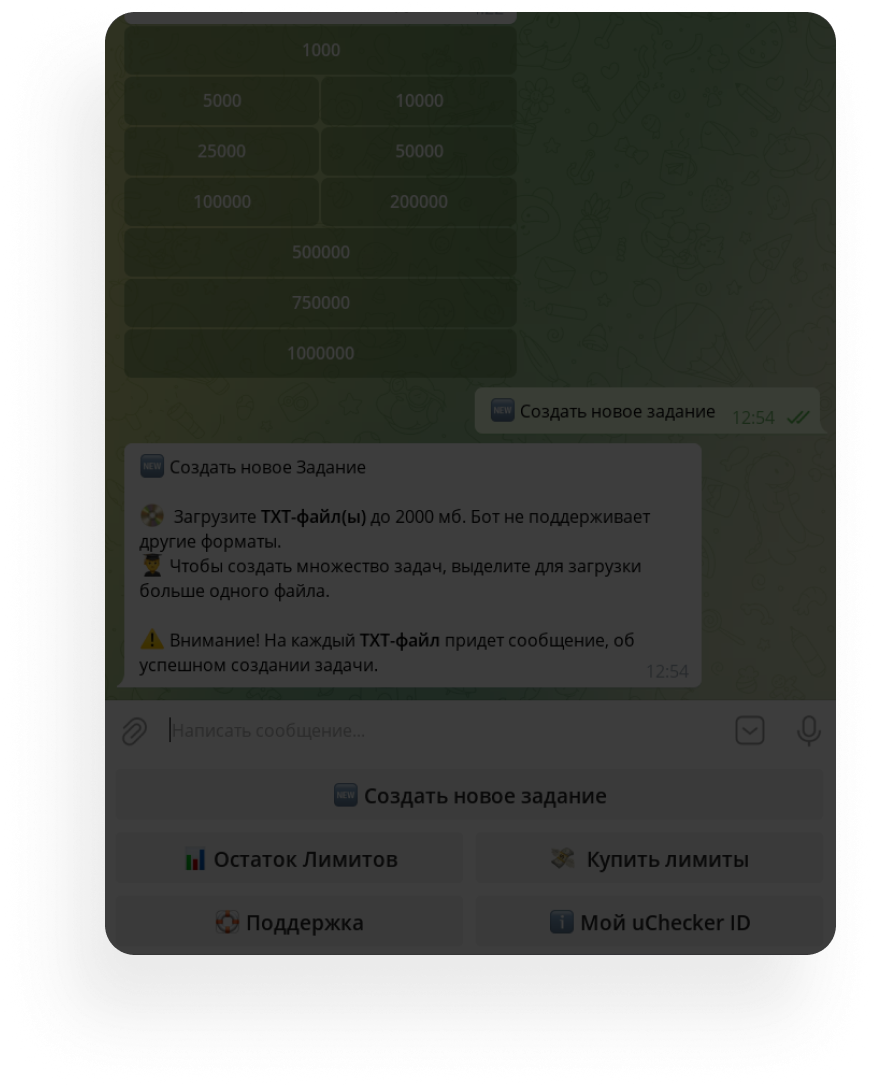
Upload your list as a .txt file or paste it in. No pre-cleaning needed, because we strip bad domains ourselves and never charge for them.

Wait for processing. The breakdown sits in the dashboard, and the Good, Bad and Unknown lists come down as one archive.

Your check history lives in the dashboard: results and analytics for every job stay available whenever you need them.

A crystal-clean list, ready to send
The service is fast, and the price per verification will surprise you:
Verification starts at $3 per 1,000 addresses.
Speed of about 3,200 addresses per minute.
Web dashboard, REST API and a Telegram bot.
uChecker
A massive email address database, and a few statistical facts about the validator
Email addresses uploaded
1 444 486 294
Unique email addresses
193 095 406
Valid email addresses
79 817 916
Full, non-existent, and unreachable addresses
113 277 490

See what your list is actually made of
Once a job finishes, the dashboard opens a breakdown: how many addresses are alive, how many are dead, and why the server turned down the rest.
Total emails
12,480
Valid
9,214
Invalid
2,908
Unknown
358
Rejection reasons
The figures above are an example, shown to illustrate how a job breakdown looks in the dashboard.
A reason for every address
The full mail server response is kept in the results. You can see whether the mailbox was deleted, frozen, or simply full, instead of a flat «invalid».
The third group stays separate
Addresses that could not be checked are never counted as valid to flatter the number. Most of them are corporate mail on a company domain. The dashboard labels this group «Unknown».
Export in any shape
An archive with ready-made lists for your sending platform, or JSON and CSV with the reasons attached if you need the result inside your own system.
Pay for access
Pick the plan that fits your volume. The more addresses, the lower the price per address.
First 100 addresses free
Try the service at no cost
1,000 addresses
$3 per 1,000
$3
5,000 addresses
$2.60 per 1,000
$13
10,000 addresses
$2.50 per 1,000
$25
25,000 addresses
$1.88 per 1,000
$47
50,000 addresses
$1.88 per 1,000
$94
100,000 addresses
$1.87 per 1,000
$187
200,000 addresses
$1.00 per 1,000
$199
500,000 addresses
$0.62 per 1,000
$312
750,000 addresses
$0.63 per 1,000
$469
1,000,000 addresses
$0.63 per 1,000
$625

uChecker Blog
Notes from an email marketer who knows the technical side too.
Predictive Analytics in Email Marketing: What Actually Works
How ML models predict unsubscribes, optimize send times, and score lifetime value — and why none of it works without a clean list first.
Best Email Validation and Verification Services: Comparison and How to Choose
Eight email verification services compared on free tiers, prices, bulk limits, API and unknown billing, plus how to test accuracy and when free tools are enough.
What Is a Mail Server? Corporate Email Server Components Explained
What a mail server is and what it is made of: MTA, MDA, MUA, SMTP, IMAP, DNS records, TLS and anti-spam. How a message travels, the types of mail servers, and where the chain usually breaks.
Email Marketing Trends 2026: What's Actually Working Now
Interactive emails, AMP, AI personalization, zero-party data, and list hygiene: the 2026 email trends that move real numbers, with concrete data and no hype.
How Spam Filters Work: Rules, Machine Learning and AI
How a spam filter decides where a message goes: connection and authentication checks, content filtering, recipient reactions, Gmail's models, and what it means for your campaigns.
Email Validation at the Infrastructure Level: Milter and Postfix
How to validate email at the MTA layer using Postfix restriction classes, policy servers, and milter filters — with configuration examples and architecture breakdown.
Email Verification Online and Bulk Email List Validation
uChecker is an online service for verifying email addresses and cleaning mailing lists. Each job handles up to 9 million addresses. The result comes back as three lists: Good, Bad and Unknown. List cleaning removes non-existent and full mailboxes and sets aside addresses on domains with no MX records or on public blocklists as Unknown, so your campaigns reach only real subscribers.
Why check whether an email address exists before you send? Every major ESP ( Unisender, Mailchimp, Sendsay, Brevo, SendPulse ) tracks your bounce rate and throttles deliverability when your list has too many dead addresses. A high bounce rate damages your domain and IP reputation, pushes messages into spam, and drives unsubscribes. One pass through the email validator removes dead addresses before you send and restores your inbox placement rate.
How the uChecker email validator works
The service checks each address through a cascade of validations. First comes syntax validation: is the format valid, are there any forbidden characters? Next is DNS validation and MX record check: does the domain have a working mail infrastructure? Then comes SMTP verification : we open a connection to the mail server and ask whether the mailbox exists, without sending any message. Major providers are handled by dedicated methods: Mail.ru, for one, answers «accepted» to almost any address, so an ordinary SMTP probe lies about it.
Checking whether a mailbox exists, and where it falls short
The mailbox check is an SMTP conversation cut short: the validator sends EHLO, MAIL FROM and RCPT TO with the address, reads the reply and disconnects with QUIT before any message is transferred. A 250 means the server will take mail for that mailbox, a 550 means there is no such mailbox, and a 4xx code such as 450 or 451 is a temporary refusal worth retrying later. SMTP also has a dedicated VRFY command, but RFC 5321 lets servers disable it, and a disabled server replies 252, which confirms nothing, so validators ask through RCPT TO instead.
The answer is not always definitive. A catch-all domain accepts any address. Greylisting turns away the first attempt from an unfamiliar sender. Large providers rate-limit frequent probes. Some servers agree to every recipient and reject only after the message arrives, and a validator whose own IP is blocklisted gets refused across the board. A catch-all domain is spotted with a control probe for an invented address: if the server accepts that too, its answer for the real address means nothing. Addresses like these land in the unknown group, and you do not pay for them. To test your own mail server, use the SMTP test.
A mailbox that exists is not automatically worth mailing, so the SMTP answer is combined with domain checks. Known throwaway and misspelled domains are rejected outright, and a domain whose name looks like temporary mail goes to unknown.
What email list cleaning finds
- Non-existent mailboxes produce hard bounces that fail on every send and hurt your reputation.
- Full and frozen mailboxes, where the server takes the connection but never delivers the message.
- Domains with no MX records and domains whose mail servers never answer. These go to unknown, since the server may be back tomorrow.
- Domains on public blocklists such as DNSBL, Spamhaus and URIBL, also set aside as unknown.
- Misspelled domains of popular mail services: gmal.com, gmial.com, mial.ru. The service knows these from a list and rejects the address at once.
A separate matter is catch-all domains, role-based addresses and disposable email. An SMTP probe gives no conclusive answer on any of them, and that is a limit of the protocol rather than of one service. What they are and how to handle them on your own side is covered in the glossary.
Who needs email list validation
Email marketers before a campaign, B2B teams before cold outreach, and any product that collects email addresses at registration. Anyone who cares about deliverability and sender reputation. Cleaning your list before importing it into a new ESP saves money: you stop paying to send to dead addresses, and a high percentage of valid subscribers gives your domain a strong warm-up from day one.
How much does email verification cost
The price starts at $3 per 1,000 addresses on the smallest plan and drops to $0.63 per 1,000 at a million addresses. The first 100 are free, which is enough to run a test sample from your own list and see the validator's accuracy for yourself. You can sign up in the web dashboard or through the Telegram bot @uchecker_bot; no credit card required.
Is email validation the same as email verification?
In everyday use, yes. Validation, verification, checking and list cleaning all describe the same job, and vendors pick whichever word they like, so arguing over the label gets you nowhere.
If you do want to split them, split by stage. Validation usually means checking the address format and the domain; verification means confirming that a particular mailbox exists and accepts mail. That gives three levels:
- Syntax validation parses the address by the rules of RFC 5321 and 5322 and catches a missing @, spaces, two dots in a row. It is the fastest level and the weakest, because a perfectly written address can still point at a mailbox that isn't there.
- DNS and MX validation confirms that the domain has a working mail server. MX record checks cut out dead domains.
- SMTP mailbox verification connects to the mail server and confirms the address exists without sending a message (HELO/EHLO, MAIL FROM, RCPT TO).
For whoever owns the list, depth matters more than the name. A signup form will notice a typo but has no idea whether the mailbox is open. To find that out, a validator has to reach DNS and then the domain's mail server, whatever it calls itself.
How to read the results
A report splits addresses into three groups: good, bad and unknown. For good addresses the server confirmed the mailbox exists and you can send. Bad means the mailbox does not exist, is full, or the address is malformed; those come out of the list permanently and go onto the suppression list. For bad and unknown addresses the report also gives the reason as the server's reply, and the reason decides what you do next.
Catch-all means the domain accepts mail at any address, so confirmation proves nothing. These are not discarded: catch-all is common on corporate domains, which is where the contacts you want tend to live. Segment them and send in small batches, watching actual bounces rather than predicted ones.
A disposable mailbox exists right now and will stop existing within the hour, so sending is pointless. Role-based addresses like info@ or support@ exist and are read, but nobody behind them opted in, so a marketing message there will very likely draw a complaint. Keep them for transactional mail and exclude them from campaigns.
The unknown group holds addresses whose deliverability could not be determined. The domain has no MX records, none of its mail servers can be reached, it looks suspicious, or it is on a blocklist. Catch-all domains land here too, along with servers that never confirmed the mailbox and temporary refusals that did not clear after retries. Hold them back and re-check them later. We do not charge for unknown, because billing for the answer "no idea" is not right. Watch this share separately, since zero unknowns does not mean perfect accuracy, it means the ambiguous cases were quietly filed as deliverable.
How often to re-check
A one-off cleaning solves today and not tomorrow. Lists decay on their own: people change jobs and lose corporate addresses, providers delete abandoned mailboxes, someone opens a new account and forgets the old one. There is no single interval that suits every list, so tie the check to events. Check the list:
- before the first send to a new list, especially one collected over a long time, from several sources, or handed over by another team;
- after a long break in sending, and before you try to win back an old segment;
- when importing someone else's list (the check shows the state of the addresses, but it gives you no right to email those people);
- when your bounce rate goes up, so permanent failures get separated from temporary ones and a live contact isn't dropped after a single hiccup;
- when the lead source changes, or one form suddenly starts producing lots of typos.
The less often you send and the older the contacts, the more a check before a big campaign is worth. Validation at signup stops typos at the door, but it can't stop ageing: an address that worked on the day someone registered may close later. Store the check date next to the status, because without it the status says little six months on.
One important caveat: validation confirms an address exists and says nothing about consent. A technically clean list of people who never subscribed is still spam, and providers detect it through behaviour: low opens, complaints, spam trap hits. Checking addresses treats a different problem from the one causing it.
What happens to the list after a check
The report is where the work starts, not where it ends. Undeliverable addresses come out immediately and go onto a suppression list so they cannot return on the next import from your CRM. That matters more than it sounds: dead addresses usually re-enter a campaign precisely because the list is cleaned in one place and exported from another.
The suppression list has to be shared across every sending channel. The classic failure is keeping it inside the marketing platform while transactional mail goes out through a separate server. The address is suppressed for campaigns and still receives order notifications, bounces keep accruing, and nothing in the marketing reports explains why.
Soft bounces get a counter: several in a row on one address means the mailbox has been full for a long time or is no longer served. A single soft bounce is ignored, since that is ordinary network noise rather than a signal.
Why a high bounce rate does real damage
Bounces are harmful less in themselves than in how the receiving side reads them. To a provider, a high rate says plainly that the sender does not know who they are writing to. That conclusion attaches to the domain, not just to the campaign that triggered it.
Then accumulation takes over. Domain reputation has inertia: it degrades in one bad send and takes a long stretch of careful sending to recover. Preventing the spike is far cheaper than working it back.
Acceptable rates depend on message type and on the ESP, since each sets its own thresholds. Transactional mail should bounce at close to zero, because a live person typed that address minutes ago, so any noticeable bounce rate there points to a form with no validation. Marketing to an accumulated list bounces more, and a rate that keeps climbing from campaign to campaign means the list has not been cleaned in a long time.
A note on spam traps
The most awkward kind of dead address is the one that is technically alive. Providers convert abandoned mailboxes into traps: the MX is in place, SMTP answers affirmatively, the syntax is valid. Any validator calls it deliverable, because it is deliverable. The only difference is that nobody is behind it.
So validation reduces the risk without removing it. It clears dead addresses and thereby slows the future supply of recycled traps. Against one that already exists, only hygiene helps: double opt-in at signup, regular pruning by engagement, and removing anyone who has not opened a message in a year.
API integration for validation in your product
Beyond the web dashboard and the Telegram bot, uChecker offers a REST email validation API for embedding checks in a registration form, CRM (Bitrix24, amoCRM, HubSpot), or ESP. Asynchronous processing of large lists is supported via webhook. Methods, code samples and response formats are in the API documentation.
Want to go deeper on email validation terms, deliverability, and authentication (SPF, DKIM, DMARC)? Browse our email marketing and validation glossary (100+ articles covering SMTP, SPF, DKIM, DMARC, BIMI, bounce codes, domain warm-up, and mail protocols) and the email marketing blog.
What email validation is, and what counts as a valid address
Email validation checks whether a message can be delivered to an address. A valid address exists and accepts mail. An invalid one is either written wrong, points at a domain with no mail, or leads to a mailbox the server does not have.
In between sit addresses that are technically alive but not worth mailing. A disposable mailbox disappears within hours. A role address such as info@ is read by someone, but nobody there signed up. A spam trap looks like an ordinary mailbox and exists only to catch senders with old or bought lists. Duplicates harm nothing by themselves, but you would pay for every copy, so the service removes them automatically and for free.
The stages of a check, step by step
Syntax. The address is split into a local part and a domain and checked against RFC 5321 and 5322. The local part is at most 64 characters, the domain at most 255, and the whole address with its angle brackets fits in 256, which leaves 254 for the address itself. This stage catches double dots, spaces, a leading dot and Latin letters swapped for Cyrillic look-alikes. The full address grammar does not fit into one regular expression, so this step needs a proper parser rather than the short regex from a signup form.
Domain and MX. Next the validator asks DNS where the domain's mail should go. With no MX records, RFC 5321 treats the domain itself, via its A record, as the mail server. If MX records exist but none of the servers work, the address is undeliverable. A special case is Null MX (RFC 7505): a single record with preference 0 and a dot for a name, which is how a domain states outright that it takes no mail. You can see these records in the MX lookup.
Mailbox. The last step is the SMTP conversation described above, cut off before any message is sent. Here is how Gmail answers for a mailbox that does not exist:
RCPT TO:<no-such-user@gmail.com>
550-5.1.1 The email account that you tried to reach does not exist.
A rejected address comes with a reason in the report, which shows whether the mailbox was removed, is full, or the address is malformed.
Bulk verification of a large list
In the web dashboard you upload a .txt file with one address per line or paste the list into the form. Through the API you send addresses as a JSON list, and the service calls your webhook when the job is done. The Telegram bot returns an archive with good and bad. A single job takes up to 9 million addresses, and duplicates are removed automatically.
Validators do not work through a big list strictly in order. They group addresses by domain: the MX for gmail.com only needs to be looked up once for the whole file, and each domain's server is contacted as often as it will accept. So speed depends on more than size. uChecker checks about 3,200 addresses a minute, but a file of big-provider addresses finishes faster than a list of the same size spread across hundreds of company domains, where every domain needs its own lookup and some servers answer slowly or ask to retry later.
Save the file as UTF-8. In other encodings, addresses with non-Latin characters break and get rejected as syntax errors.
What a validator can tell you, and what it can't
A validator sees the technical state of an address at the moment of the check. It will find a malformed address, a domain that doesn't exist, a mail server refusing the recipient, signs of a throwaway service. All of that is information about DNS and servers.
About the person behind the address it knows nothing. A working mailbox can sit unread for years, or belong to someone with the same name at a different company. Whether your message lands in the inbox is up to the recipient's spam filter, which judges the sender and the message itself; the mailbox existing is just where that starts. Consent is on you as well, since a check can't stand in for it.
Why 100% accuracy does not exist
A validator promising 100% is promising the impossible. A catch-all server agrees to any address. Greylisting turns an unfamiliar sender away on the first try, so the answer before a retry means nothing. Some servers accept every recipient and reject only after the message arrives. And a mailbox that was alive at check time can vanish a week later when its owner leaves the company.
That is why an honest report always has an unknown group, and why lists are re-checked before a large campaign and after a long break in sending. Addresses that already hard-bounced are not re-checked; they are removed at once.
It is easier still to keep junk out of the list in the first place. Double opt-in filters out typos and other people's addresses, validation in the signup form catches non-existent mailboxes before they are saved, and a bought list brings spam traps and people who never agreed to hear from you.